

OCR Training Data: Collecting Real Receipts and Handwriting

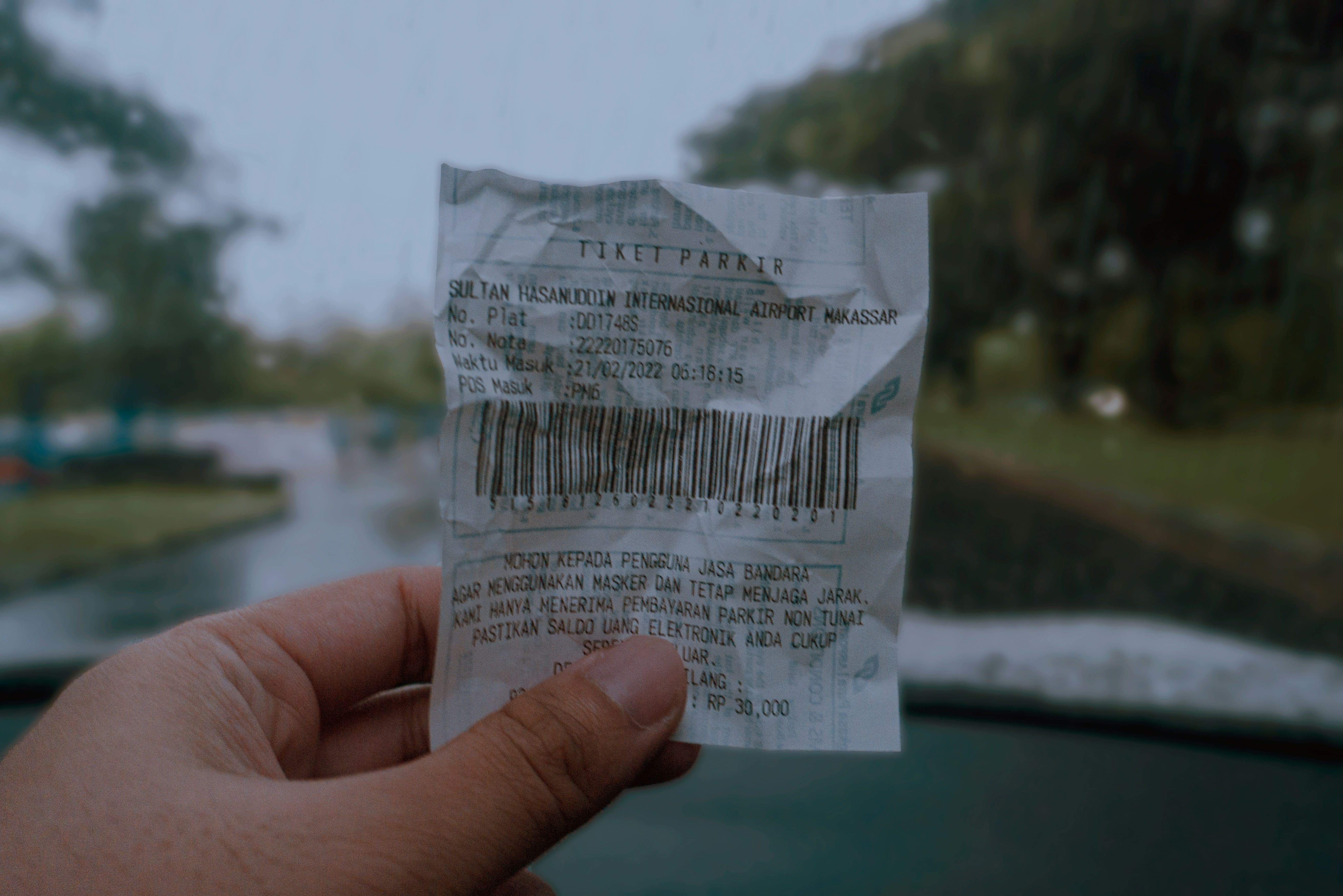
One of the best-known receipt datasets, SROIE from the ICDAR 2019 competition, contains just 1,000 scanned receipts. The popular forms dataset FUNSD has 199 documents, also scanned and also in English. Your users, meanwhile, photograph a crumpled receipt on their knee under a kitchen light, in Thai or Arabic, with glare across the total.
The gap between a clean scan and a photo like that is one of the main reasons an OCR model with great benchmark numbers disappoints in production. The only thing that closes it is your own OCR dataset built from real photos. Below, we cover which documents and capture conditions it needs, how to write the collection task, how to transcribe the text, what to do about personal data, and what it all costs.
Why OCR Models Fail on Real-World Documents
A model learns from what it has seen. If its training data was flat scans, it struggles with anything that doesn't look like one. In practice, there are five such differences:
- Photos instead of scans. Perspective, curved paper, shadows from a hand, glare, blur and the compression of a budget phone camera.
- Document condition. Faded thermal receipt paper, fold marks, stains, stamps over the text.
- Script and language. Devanagari, right-to-left Arabic, Thai with no spaces between words, two languages mixed in one line.
- Layout. Receipts from different countries and cash registers format dates, totals and taxes differently; forms change from one organization to the next.
- Handwriting. Everyone writes differently, and what matters for a model to generalize is the number of different writers, not just the number of pages.
Synthetic distortions such as rotation, noise and blur help, but only partly. They don't reproduce real thermal paper, real lamp glare or a specific person's handwriting.
Public OCR Datasets and What They're Missing
Public datasets are great for getting started and for comparing models. But they all share the same limitations:
Dataset | What's inside | What's missing for a product |
|---|---|---|
1,000 scanned receipts with key-field labels | Phone photos, other countries and languages, modern receipt formats | |
1,000 publicly released Indonesian receipts (800 train, 100 dev, 100 test) | Other countries and layouts; only part of the 11,000+ receipts collected was published | |
199 scanned forms in English | Volume, your form templates, other languages | |
English handwriting from 657 writers | Other scripts, digits and forms, phone capture instead of a scanner |
The overall picture: scans instead of photos, English instead of local languages, and hundreds or thousands of examples instead of the variety your product will face. Use them for pre-training and baseline comparisons, and collect your own data for the test set and fine-tuning. And check the license: some public datasets are licensed for research only, not commercial use.
Which Documents and Capture Conditions Your OCR Dataset Needs
The makeup of the dataset should mirror what the model will see in production. Each document type comes with its own typical difficulties:
Document type | What to capture | Typical model errors |
|---|---|---|
Receipts | Different stores, countries and cash registers, faded thermal paper, long receipts | Confuses the total with the tax amount, loses lines at a fold |
Invoices and delivery notes | Tables, company details, stamps and signatures over the text | Breaks the table structure, reads a stamp as text |
Forms and questionnaires | Printed fields plus handwritten entries, checkmarks, crossed-out text | Fails to link a field to its value, misses marks |
Handwritten notes | Many different writers, different paper and pens, digits and abbreviations | Learns a few people's handwriting instead of generalizing |
Text in the wild | Packaging, price tags, menus, signs, screens | Misses text on busy backgrounds, confuses decorative fonts |
On top of document type, define a matrix of capture conditions: tilt and perspective, crumpled or folded paper, low light, glare and shadows, slight blur, different phone models. It's important to include good shots too: if every photo is difficult, the model won't learn the normal case. We covered the general principles of image collection in our article on image data collection for computer vision.
Note: collect documents for each script and language in the countries where they're actually used. A receipt from a Bangkok store and Thai text printed in another country are different data, with different fonts, layouts and number formats. That's what geo-targeting is for.
How Much Data an OCR Model Needs
There's no universal number, because hardly anyone trains OCR from scratch today. The typical path is to take an existing model or a multimodal neural network and fine-tune it on your own documents. Benchmarks from practice, not hard rules:
- The test set comes first. A few hundred real photos with exact transcriptions show how well an off-the-shelf model already works. Sometimes that's enough to learn you don't need fine-tuning at all.
- Fine-tuning on one document type. Teams usually start with a few hundred to a thousand examples and look at where the model keeps failing. For reference: the public part of the CORD dataset has just 800 training receipts, and it's often used to demonstrate fine-tuning of receipt-parsing models, for example in an NVIDIA guide to fine-tuning the multimodal Gemma model.
- A new script or handwriting. You need noticeably more data, and for handwriting the number of different writers is critical. A hundred pages from one person give less than one page from each of a hundred people.
Quality on the test set is usually measured by character error rate (CER) and word error rate (WER). For documents like receipts, it's more useful to measure accuracy on key fields: the date, the total, the store name. One wrong digit in the total matters more than a dozen typos in product names.
Why Build Your Own OCR Dataset When Multimodal Models Exist
Many teams today don't train OCR at all; they send photos to a multimodal model through an API: GPT-4o, Gemini, Qwen-VL and others. These models read a wide range of layouts without fine-tuning, and for some tasks that's enough. But you still need your own data in that case, just for different purposes:
- To check how reliable the model is on your documents. With classic OCR, an error is usually visible: a character is misread or missing. A multimodal model can output plausible text that isn't in the image, and you won't spot that kind of error in a total by eye. The only way to learn how often it happens is a test set with reference transcriptions.
- To choose a provider. The same set of a few hundred real photos lets you compare several models fairly on accuracy, price per page and speed.
- To fine-tune an open model. If documents can't be sent to a third-party API, or there are millions of pages and paying for each gets expensive, teams fine-tune an open multimodal model and run it themselves. That takes the same photo-and-text pairs.
- To cover weak spots. Rare scripts, messy handwriting, forms specific to your industry: universal models fail most often exactly where there's little data online.
The practical takeaway: even if you don't plan to train anything, a test set of real documents is the only way to know whether you can trust your chosen model with totals, dates and names.
How to Write an OCR Data Collection Task
The most efficient format is a single task in two parts: a person photographs a document and then types out its text. That gives you an "image plus reference text" pair in one step. A good task specifies:
- What exactly to photograph. "Your own grocery store receipt from the past month" works better than "any receipt."
- Capture conditions. Different conditions for different campaigns: flat on a table, at an angle, in low light, a crumpled document. That way you control the dataset's makeup instead of leaving it to chance.
- How many files per task. For example, five different receipts. Don't take more than five to ten from one person: they shop at the same stores, use the same phone and shoot in the same kitchen.
- Transcription rules. Line by line, characters and digits exactly as printed, with no corrections to typos or abbreviations. An unreadable spot is marked with a tag such as [?], not a guess.
- Personal data rules. What to cover before shooting and how to mark covered parts in the transcription.
- A good and a bad example. One photo with a correct transcription and one with typical mistakes.
Example task: "Photograph 5 different receipts of your own from stores or cafes from the past month. Place each receipt on an ordinary surface and shoot handheld, without lining it up perfectly. Before shooting, cover your card number, name and phone number with a piece of paper, if they appear. For each receipt, type out all the text line by line exactly as printed; mark covered parts as [HIDDEN] and unreadable ones as [?]."
Pro Tip: for long documents, split capture and transcription into two tasks. When someone has to type out a page of small print, they start skipping lines toward the end, and that kind of work needs a different rate.
Transcription and Annotation: What Level of Detail You Need
The annotation you need on top of the photo depends on the model's job. The more detailed the annotation, the more it costs and the more important it is to verify:
Level | What the person does | What it's good for |
|---|---|---|
Full-document text | Types out the text line by line | Evaluating and fine-tuning image-to-text models |
Key fields | Enters the date, total and vendor into a form | Extracting data from receipts and invoices |
Lines and words with boxes | Draws a box around each line or word and labels its text | Training text detectors and classic OCR pipelines |
Document structure | Links fields to values, annotates tables | Form understanding, as in FUNSD |
The first two levels split well into microtasks and can be done right on a phone. Boxes and structure need an annotation tool and training, and usually run as a separate stage. We wrote about organizing that kind of annotation through outsourcing in our article on outsourcing data labeling.
Personal Data in Documents: What You Can and Can't Collect
Real documents almost always contain personal information, and that's the main constraint on OCR data collection. The working rules are:
- Own documents only. Contributors photograph their own receipts and papers, not other people's.
- Cover personal details before shooting. Names, addresses, phone numbers and card numbers are covered with a piece of paper or blurred. Submissions with personal data you didn't ask for are rejected.
- No ID or bank documents. Passports, ID cards, bank statements and payment cards are not collected through an open platform at all.
- Template forms with fictional data. You upload a blank form, and the contributor prints or copies it and fills it in by hand with made-up details. It's the safest way to get handwriting samples and forms of your own type.
Warning: contributors covering personal data is not a guarantee. Before training, run the transcriptions through detection of names, phone numbers and card numbers, and delete or blur questionable photos yourself. If the corpus will be used in the EU or other jurisdictions with strict laws, check the requirements with a lawyer.
Quality Control: Photos, Transcriptions and Fakes
OCR collection has two sources of error: a bad photo and an inaccurate transcription. The second is more dangerous: the model will treat it as ground truth, and your test-set quality metric will be measured against the wrong answer. What to check:
- Photo and text match. A skipped receipt line or transposed digits are visible when you compare, even on a sample.
- A second check by another contributor. A separate task: compare someone else's transcription with the photo and flag errors. For the test set, this is close to mandatory.
- An existing model as a filter. If a transcription differs sharply from what an off-the-shelf OCR reads on a good photo, take a look by hand. But don't reject automatically: sometimes it's the model that's wrong.
- Fakes. A photo of a screen instead of paper, an image from the internet, the same receipt shot from different angles. Reverse image search, near-duplicate detection within the set and file metadata help catch many of them.
Check the dataset's variety with metadata, not intuition: country, document type, capture conditions, an anonymous contributor ID. The last one is also needed for a clean train/test split: all documents from one person should land in the same part. For more on how many different contributors make a dataset more robust, see our article on building diverse datasets.
OCR Data Collection on RapidWorkers: Process and Cost
More than 195,000 workers from 200+ countries are registered on RapidWorkers, so you can collect documents in any script used in the countries you choose: Latin, Cyrillic, Arabic, Devanagari, Chinese characters, Thai, Bengali and others. You create an image collection task, specify what to photograph and how to transcribe it, and set the number of files per submission. Each worker can complete a task only once. Details are on the OCR data collection page.
The employer sets the rate per task, and a 15% fee is added on top. The minimum deposit is $20, the minimum campaign is $0.30, and rejected submissions aren't paid. A long transcription costs more than a short one. Here are examples with illustrative rates:
What you collect | Tasks and rate | Tasks | 15% fee | Total |
|---|---|---|---|---|
Pilot: 1 receipt with transcription, ~4 min | 20 × $0.50 | $10.00 | $1.50 | $11.50 |
200 contributors with 5 transcribed receipts each (1,000 photos), ~15 min | 200 × $2.25 | $450.00 | $67.50 | $517.50 |
Handwritten template form from 300 different writers, ~10 min | 300 × $1.50 | $450.00 | $67.50 | $517.50 |
Second check of receipt transcriptions, ~2 min per receipt | 1,000 × $0.30 | $300.00 | $45.00 | $345.00 |
The rates in the table assume roughly $7–9 an hour for actual working time. Transcription is painstaking work, and at an underpriced rate people start skipping lines and rounding numbers, which are exactly the errors your model will then learn. Measure the real task time in your pilot and adjust the rate to it. Handwritten forms give you what public datasets lack: hundreds of different handwriting styles on your own template, with not a single real name in the data.
OCR Training Data FAQ
What is an OCR dataset?
It's a set of images containing text, each paired with an exact transcription of that text. Sometimes it also includes boxes around lines and words or key-field labels, such as the date and total on a receipt. Models are trained and evaluated on these pairs.
Where can you get OCR training data?
Public datasets such as SROIE, CORD, FUNSD and IAM work for getting started, if the license allows your use. A product needs its own data: real photos of your document types, in the right languages and real capture conditions. Teams collect it through crowdsourcing platforms or partners.
How many images do you need to train an OCR model?
To fine-tune an existing model on one document type, teams usually start with a few hundred to a thousand examples; for comparison, the public part of CORD has 800 training receipts. A new script or handwriting takes noticeably more, and for handwriting the number of different writers matters. Start with the test set.
Can you train OCR on synthetic data alone?
Synthetic data, meaning generated text on images with distortions, works well for pre-training and adding volume. But the test set should consist of real photos, or you won't know how the model handles thermal paper, glare and real handwriting.
How do you collect receipts and forms without violating privacy?
Contributors photograph only their own documents and cover names, addresses, phone numbers and card numbers before shooting. ID and bank documents aren't collected. For forms, the safest route is blank templates filled in with fictional data.
What Makes an OCR Dataset Useful for a Product
Public datasets teach a model to read clean scans, while your product needs it to read what people actually send. A good OCR dataset rests on four things: real photos in varied capture conditions, documents from the countries and in the languages where your product operates, accurate transcriptions with a second check, and clear rules on personal data. Start with a test set of a few hundred real photos: it will show where your model fails, and from there you can collect data in a targeted way.
If you need receipts, forms or handwriting samples from specific countries, launch a pilot campaign on RapidWorkers. We covered the overall AI data collection process in our guide to AI training data collection.
Ready to Get Started?
Join thousands of workers and employers already using RapidWorkers to get tasks done fast.
- No subscription
- Cancel anytime
- 24/7 availability
- Dispute resolution