Get Discord Server MembersGlobal Marketplace

Buy Discord Members.Real Accounts, No Bots

Buy Discord members starting at $0.05. Real workers join your server from their own accounts via your invite link — no bots, no farms. Review screenshot proof before you pay.

500+

New Workers Daily

10,000+

Tasks Completed Each Month

From $0.05

Per Member Task

24/7

Global Marketplace

Choose Your Members' Countries

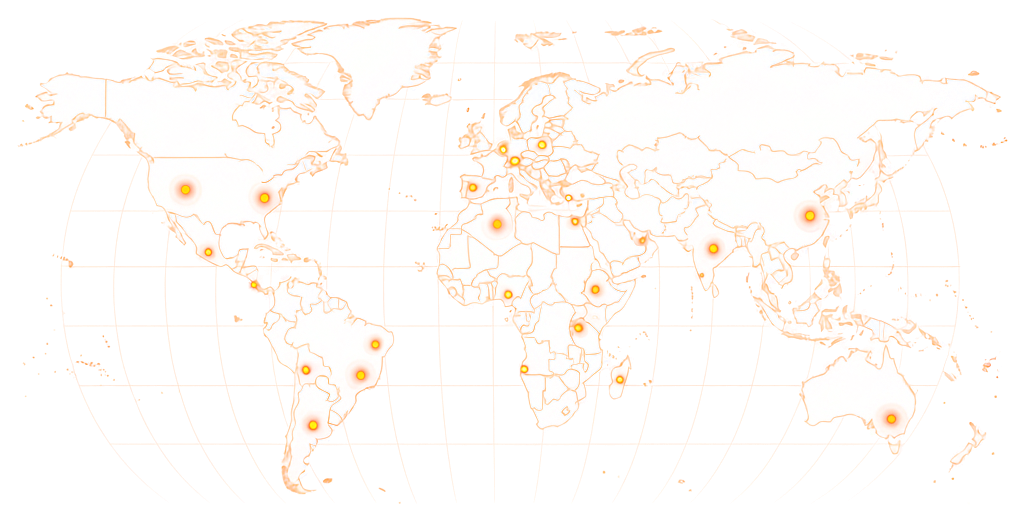
Buy Discord Members From 190+ Countries

Target members from specific countries that match your community's audience — or open the task to workers worldwide. Geo-targeted joins let you build a member base from the regions that matter to your server's purpose.

World map showing RapidWorkers coverage across 190+ countries

Available in 190+ countries — choose your audience when you create your task.

Pricing

Discord Members Pricing

Discord server join tasks start at $0.05 per member. Tasks that require a screenshot with the member list visible, members from a specific country, or accounts meeting a minimum activity level reward more to attract qualifying workers.

Minimum Reward

$0.05

per completed task

Example Task Rewards

TaskExample Reward
Join Discord server, basic screenshot proof$0.05–$0.07
Join with member panel screenshot confirming username$0.07–$0.10
Join from a specific country$0.08–$0.12
Join and send a message in a specified channel$0.10–$0.15

*These are examples, not fixed pricing tiers.

Calculate Your Cost

Estimate your total budget based on the number of members and reward per task.

Example: 5,000 tasks × $0.08 reward = $400 estimated total

Discord Server Join Task

Calculator
Tasks5,000

Reward Per Task$0.08

Estimated Total5,000 × $0.08

$400
Create Task

RapidWorkers members are real people who join using their own active Discord accounts — not offline bots or fake online-status accounts sold by typical Discord member services. Discord shows server member counts publicly. Run your campaign gradually — 100–200 members per day over several days — for a growth pattern that looks consistent with organic promotion.

How It Works

How to Buy Discord Server Members

Share your invite link, post your task, and real workers join your Discord server from their own accounts — you approve every submission before paying.

01

Create Your Task

Paste your Discord server invite link, set the reward per member, and choose how many you want. Add any requirements — country, account age, activity level — and your task goes live immediately.

02

Workers Join Your Server

Real people find your task, click your invite link, and join your Discord server from their own accounts. No bots, no scripts, no automation. Each worker joins once.

03

Review Screenshot Proof

Workers submit a screenshot showing your Discord server with the member count updated and their Discord username visible. Review each screenshot — approve joins that meet your requirements, reject anything that doesn't.

04

Your Server Grows

Approved members are already in your server. Your member count updates in real time as tasks are completed. Track progress from your RapidWorkers dashboard.

Use Cases

When Does Buying Discord Members Actually Make Sense?

Discord server member count is one of the first things people check when deciding whether to join. These are the situations where reaching a credible number changes what happens next.

New Server Launch

Problem
A Discord server with 8 members signals to anyone who receives an invite that the community either just launched or never gained traction. Most people decline invites to near-empty servers — the empty member list is a social proof failure before anyone has even seen the channels.
With RapidWorkers
Workers join the server from their own real Discord accounts, building the member count to a credible level before you start inviting real community members or promoting the server externally — so the first impression is a functioning community, not an abandoned one.

Gaming Community or Game Launch

Problem
Games that link a Discord server in their Steam page, app listing, or trailer need the server to look alive on launch day. A server with 30 members when 10,000 people buy the game on day one signals that nobody is playing — which suppresses join rates from early buyers.
With RapidWorkers
Workers build the server's member count before launch so that when players click the Discord link on launch day, the community looks active and worth joining — which drives organic joins from players who see a real community rather than an empty lobby.

NFT or Web3 Project Server

Problem
NFT and Web3 projects are evaluated heavily on community size. Investors, collectors, and partners check the Discord server member count as a primary signal of project legitimacy and demand. A server with 200 members competing against projects with 50,000+ reads as a low-credibility project regardless of the underlying work.
With RapidWorkers
Workers grow the member count to a range that makes the project look like it has real community interest — which affects how collaborators, marketplaces, and investors evaluate the project in their initial research.

Brand or Product Community

Problem
SaaS products, consumer apps, and creator tools that link a Discord server from their website or documentation undermine trust when the server shows a handful of members. Prospective users interpret low member counts as a signal that the product has few real users.
With RapidWorkers
A credible server member count turns the Discord link from a liability into a social proof signal — it tells prospective users that real people use and discuss the product, which increases the likelihood they join the community and convert.

Influencer or Creator Community

Problem
Creators launching a Discord server for their audience often find that a low member count suppresses organic growth — fans who see a near-empty server are less motivated to join and participate than fans who join a visible community with hundreds of members already active.
With RapidWorkers
Workers seed the server with a foundation of real members, creating the social momentum that makes organic growth self-sustaining — the critical mass of members that makes a new joiner feel like they're entering a real community rather than a creator's failed experiment.

Course or Membership Community Server

Problem
Online educators and membership programs that use Discord as their student community often link the server in sales pages and email sequences. A server with 40 members tells potential buyers that few people have purchased — which is a visible conversion signal that suppresses sales.
With RapidWorkers
Building the server member count to a number consistent with the claimed or realistic student base removes the social proof contradiction between the sales page claims and the empty Discord server that prospective buyers see when they check.

Bot Members Get Purged. Members From Real Accounts Stay.

Discord's Trust & Safety Systems Target Fake Accounts

Services that deliver Discord members through bots or account farms have a structural problem: Discord regularly purges suspicious accounts. Accounts that joined too many servers in a short period, have no profile picture, or show no genuine activity get flagged and removed. You pay for 1,000 members, Discord removes 600 of them, and your count drops.

RapidWorkers workers are real people joining from their own active Discord accounts — profiles with genuine activity history, profile pictures, and organic server participation. These joins look legitimate because they are, and they survive the account sweeps that remove bot-created profiles.

You can require workers to submit proof showing their Discord username clearly in the member panel. Every approved join is a real person who clicked your invite link — verifiable in your server's member list.

AspectRapidWorkersTypical Discord Member Service
Account sourceRegistered marketplace workers using their own Discord accountsBot accounts or account farm profiles with no real activity
Member retentionReal accounts — survive Discord account sweeps and purgesFake accounts removed periodically — member count drops after delivery
Proof of completionScreenshot showing Discord username and server joined — you approve before payingProvider confirms count — no visibility into account quality
Account quality controlYou set country, activity, and proof requirements per taskProvider controls account selection — you have no input
What you pay forOnly approved, verified joins from real accountsThe full count upfront, regardless of retention after delivery
Your Guarantee: You Only Pay for What You Approve

No Refunds Needed — You Approve Before You Pay

Every submission goes through you first. Workers join your Discord server and submit screenshot proof — you review each one and decide what counts. If the screenshot doesn't confirm a real join or the account doesn't meet your requirements, reject it and pay nothing.

  • You review every submission

    Approve or reject based on your own rules

  • Pay only for approved work

    Rejected submissions cost you nothing

  • Dispute resolution available

    For edge cases where a worker disagrees with a rejection

Example Task

What Does a Discord Server Join Task Look Like?

rapidworkers.io/dashboard/job/discord-join-example

Dashboard / Join Discord Server

Join Discord Server — GameDevHub

Pay Rate

$0.07

Time to Complete

2 min

Availability

89 / 300

Status

Active

Job Description

Join the Discord server using the invite link. Account must have a profile picture. Screenshot showing the server in your server list and your Discord username visible at the bottom-left.

Reference

Screenshot confirming Discord server join

Submission Instructions

Screenshot showing server in list and Discord username visible in the bottom-left of the app.

Complete Job

This is how workers see your task on RapidWorkers

Job Description

Click the invite link in this task to join the Discord server. Join using your own Discord account — do not use an alt account or a bot.

Your Discord account must have a profile picture set and must not be newly created within the last 7 days. Do not leave the server immediately after joining. One join per worker.

After joining, take a screenshot showing the server name in your server list on the left sidebar and your Discord username visible in the bottom-left corner of the Discord app.


Submission Instructions

Step 1: Click the invite link in the task.

Step 2: Join the Discord server from your own account.

Step 3: Screenshot showing the server in your list and your Discord username visible.

Step 4: Submit the screenshot for review.

Create Your Task
Got Questions?

Frequently Asked Questions

Discord's ToS prohibits bots and automated accounts. RapidWorkers is different: real people join your server from their own genuine Discord accounts — no automation, no bots, no scripts. A human clicking an invite link and joining a server is no different from any organic join. The risk with typical Discord member services is that they use bots that get purged in Discord's periodic account sweeps. Members from real accounts don't carry that risk.

Most Discord member services sell two products: offline members (accounts that join and appear in your total member count but show as offline) and online members (accounts that display a green active status in your member list). Offline members are typically bots or dormant accounts — they raise the number shown on your server invite but contribute nothing to the appearance of activity. Online members from bot services are also scripted accounts kept artificially connected to show green status, which Discord periodically clears. RapidWorkers does not deliver either type. Workers are real people who join your server from their own active Discord accounts. They appear as genuine members with real profile histories — not as a count inflated by offline bots or fake green-status accounts.

Yes. Every join comes from a real person using their own active Discord account — not a bot, not a scripted account, not a panel fake. Workers click your invite link and join your server manually from their own devices. You can verify this: members who joined from RapidWorkers appear in your member list as real Discord users with profile pictures, account creation dates, and activity history.

No. Workers only need an invite link to your Discord server. Your account credentials and admin access are never requested. Generate a standard invite link from your server settings and paste it into the task — that is all workers need to join.

Members from real accounts typically stay unless they choose to leave — unlike bot accounts that get purged by Discord's automated systems. However, RapidWorkers workers complete tasks and move on; some may leave a server after joining if they have no further reason to stay. To improve retention, pair your join task with an active server — members who see ongoing discussion and value are more likely to remain.

Discord server join tasks start at $0.05 per member.

For example:

100 members — $5–$10 500 members — $25–$50 1,000 members — $50–$100 5,000 members — $250–$500

You pay per approved submission — no packages, no upfront commitments.

Workers start accepting tasks within minutes of posting. Most campaigns at standard rewards complete within 4–24 hours. A higher reward per task attracts workers faster. For a growth pattern that looks more organic — gradual over several days — you can set a daily completion cap in your task settings.

Yes. Add country requirements to your task instructions — for example, 'Worker must be based in the United States.' Workers outside your target region will skip the task. Country-targeted tasks typically reward slightly more since they narrow the eligible worker pool.

Generate a standard invite link from your Discord server settings — set it to never expire and unlimited uses so all workers can use the same link. You can disable or regenerate the link after the campaign completes. Do not use a single-use or limited invite link or workers will fail to join after the limit is reached.

Yes. Workers submit a screenshot showing your Discord server with the member count updated and their Discord username visible in the member panel or profile. You review each screenshot before approving — if the proof doesn't confirm a real join, reject it.

Bot services create fake Discord accounts or use account farms to join your server automatically. These accounts typically have no profile picture, no activity history, and account creation dates clustered around the delivery date — they look like bots to anyone who inspects your member list, and Discord periodically purges them. RapidWorkers workers are real humans joining from their own accounts with genuine profile histories. The joins look organic because they are.

Yes. Many Discord server growth campaigns combine a join task with a separate task asking workers to send a message in a specific channel after joining — creating the appearance of early active discussion that makes the server look alive to new members who join organically afterward.

Ready to Grow Your Discord Server?

Create your Discord join task, share your invite link, set your requirements and reward, and let real people build your community — you approve every submission before paying.

  • No subscription
  • Cancel anytime
  • 24/7 availability
  • Dispute resolution