Get Android App InstallsGlobal Marketplace

Buy Android App Installs from Real Devices

Buy Android app installs from $0.05. Real Android users install your app from Google Play on their own phones — keyword installs available for Play Store ASO. Approve every install before paying.

From $0.05

Per Android Install

Real Devices

No Emulators

190+

Countries Available

24/7

Global Marketplace

Emulator Installs Get Flagged. Real Android Devices Don't.

Android App Installs From Real Phones vs. Emulators and Bot Accounts

Google Play's fraud detection distinguishes real device installs from emulators and bot farms — installs from flagged sources don't count and can trigger account penalties. Workers on RapidWorkers install from their own personal Android phones with genuine Play Store account history. You check the screenshot before approving.

AspectRapidWorkersTypical Android Install Service
Device typeReal personal Android phones with active Google accountsEmulators or bulk devices running automated scripts
Google Play detectionVaried device fingerprints, IPs, and account agesMatching device signatures flagged by Play Protect
Keyword signalWorkers search your keyword, find your app, installDirect API install with no search interaction
RetentionWorkers keep the app installed for your specified periodImmediate uninstall after payment — negative retention signal
Payment modelPay only for installs you reviewed and approvedPay upfront for the full count regardless of quality
Pricing

Android App Install Pricing

Android installs start at $0.05. Keyword installs — workers search your target term in Google Play then install — carry a stronger ASO signal and reward more.

Minimum Reward

$0.05

per completed task

Example Task Rewards

TaskExample Reward
Direct install from Android device, screenshot of app open$0.05–$0.10
Install + open and use app for 60+ seconds$0.10–$0.15
Keyword install (search exact term + install from results)$0.12–$0.22
Keyword install from specific target country Google account$0.22–$0.40

*These are examples, not fixed pricing tiers.

Calculate Your Cost

Estimate your total budget based on your target install count and reward per task.

Example: 5,000 tasks × $0.08 reward = $400 estimated total

Android Install Task

Calculator
Tasks5,000

Reward Per Task$0.08

Estimated Total5,000 × $0.08

$400
Create Task

Spread installs over several days — Google Play fraud detection flags sudden volume spikes from unnatural install patterns.

Use Cases

When Installs Move Your Play Store Rank

Google Play ranks apps by install velocity, keyword signals, and retention — these are the situations where Android install count changes your visibility.

Android App Launch on Google Play

Problem
A new app starts with zero ranking for any keyword — Google Play's algorithm requires install volume before distributing the app to organic search results.
With RapidWorkers
Workers deliver Android installs in the launch window, giving the app the velocity signal Google Play needs to begin ranking it in search.

Google Play Keyword Search Ranking

Problem
An app buried below the fold on 'to-do list' search results gets almost no organic traffic — Google Play ranks by keyword install signals, not just ratings.
With RapidWorkers
Workers search your exact keyword in Google Play then install, sending a direct ranking signal that moves the app up for that specific term.

Competing in a High-Volume Category

Problem
Top categories like games, utilities, and fitness have thousands of apps — install velocity determines whether a new app appears in browse, recommendations, and category charts.
With RapidWorkers
Sustained daily installs from real devices keep the app's velocity competitive against established titles in the same Google Play category.

Ranking in a New Country Market

Problem
Google Play rankings are country-specific — an app ranking well in India restarts from zero in Germany without local install signals from German accounts.
With RapidWorkers
Workers with Google accounts registered in the target country install from their local Play Store, feeding country-specific ranking signals to the algorithm.

Paid UA Conversion With Social Proof

Problem
An app showing 500 installs in Google UAC ads converts worse than one showing 100,000 — the download count on the Play Store listing directly affects ad click-through rate.
With RapidWorkers
Workers add to the real install count displayed on your Play Store listing, improving conversion for paid user acquisition campaigns.

Recovering After a Play Store Drop

Problem
A period of low installs or a bad update can cause a ranking to drop and stay down — Google Play requires fresh install signals to re-rank the app.
With RapidWorkers
Workers restore install velocity, giving the algorithm the activity signal it needs to move the app back up in search and browse results.
How It Works

How to Buy Android App Installs

Post your Google Play link, specify your keyword and geo requirements, and real Android users install your app on their own phones — you verify every screenshot before paying.

01

Create Your Task

Paste your Google Play link, set the reward, and specify your requirements: target keyword, country, minimum account age, and whether app usage time is needed.

02

Workers Install on Real Devices

Android users search your keyword in Google Play (keyword tasks) or navigate directly to the listing, then install on their own personal phone. No emulators accepted.

03

Review the Install Proof

Workers submit a screenshot of the app installed and open on their Android device. Check the device type and country match your requirements, then approve or reject.

04

Your Play Store Ranking Improves

Approved installs add to your genuine install count in Google Play Console — device diversity, geo signals, and keyword intent feeding the ranking algorithm.

190+ Countries

Buy Android Installs in Any Country

Workers from 190+ countries install your app from their local Google Play store — country-specific signals that feed Google Play's geo-ranked search algorithm for the market you want to rank in.
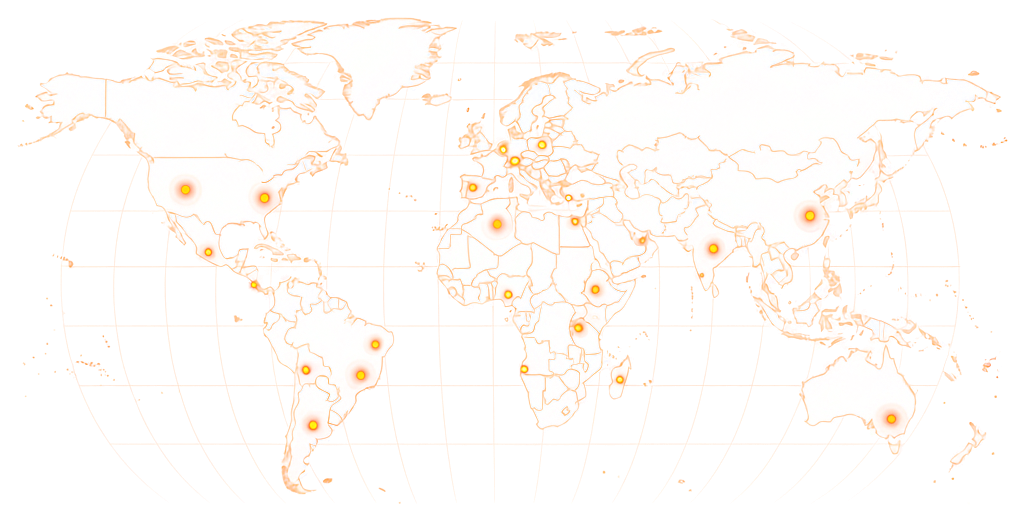
World map showing RapidWorkers coverage across 190+ countries

Available in 190+ countries — choose your audience when you create your task.

Example Task

What Does an Android Install Task Look Like?

rapidworkers.io/dashboard/job/android-install-example

Dashboard / Install Android App

Install Android App — Keyword: habit tracker app

Pay Rate

$0.14

Time to Complete

4 min

Availability

63 / 150

Device

Android only

Job Description

Search "habit tracker app" in Google Play, find and install the app from the task link in results. Open and use for 60+ seconds. Keep installed 7 days. Real Android phone only — no emulators.

Reference

Screenshot confirming the app installed on an Android device

Submission Instructions

Screenshot of the app open on your Android device with home screen or app drawer visible.

Complete Job

This is how workers see your task on RapidWorkers

Job Description

Open Google Play and search for the keyword provided in this task. Find the app from the task link in the search results and install it on your own personal Android phone. This must be a real Android device — not an emulator, Android tablet used as emulator, or PC. Your Google account should have prior app install history.

Open the app after installing and use it for at least 60 seconds. Keep the app installed for at least 7 days after completing the task. One install per worker. Submit a screenshot of the app open on your device with your home screen or app drawer visible.


Submission Instructions

Step 1: Search the provided keyword in Google Play and find the app in results.

Step 2: Install the app on your own Android phone.

Step 3: Open the app and use it for at least 60 seconds.

Step 4: Screenshot the app open on your device and submit.

Create Your Task
Got Questions?

Frequently Asked Questions

Yes. You post a task where real Android users install your app from Google Play on their own personal devices. You set your keyword, country, and device requirements, and review a screenshot of the installed app before approving payment.

Yes. Google Play's search and browse ranking algorithm uses install velocity as a primary signal. Apps that accumulate installs quickly for a given keyword move up in search results for that term. Install count also feeds category chart rankings. The quality of installs matters too — Google Play tracks retention rates, and installs from accounts that uninstall immediately send a negative signal.

A keyword install is when a worker opens Google Play, searches your exact target keyword, finds your app in the search results, and installs it from there. This tells Google Play's algorithm that real users are finding your app through that specific search term, which is the strongest signal for improving your ranking for that keyword. Direct installs don't carry the same keyword-specific signal.

Google Play's fraud detection analyzes device fingerprints, Google account age and history, IP diversity, install-to-uninstall patterns, and interaction signals. Installs from emulators, bulk-registered accounts, or devices that all uninstall within hours are flagged and discounted or penalized. Workers on RapidWorkers use real personal devices with varied accounts, IPs, and genuine app history, which produces a natural install pattern.

Tasks require workers to keep the app installed for at least 7 days by default. You can specify a longer retention period in your brief. Retention is a ranking signal in Google Play — apps with high uninstall rates within the first 24–72 hours receive lower quality scores. Requiring workers to open and use the app for 60+ seconds further strengthens the retention signal.

Yes. Google Play rankings are country-specific — your ranking in India is separate from your ranking in Germany. Workers with Google accounts registered in the target country install from their local Play Store. The install originates from that country and contributes to your country-specific ranking. Country-targeted keyword installs are the most effective way to rank for search terms in a specific market.

A direct install is when a worker navigates to your Play Store listing and installs without searching. A keyword install is when the worker searches your target term in Google Play, finds your app in the results, and installs from there. Keyword installs send a stronger ranking signal for that specific term because they include search intent. Direct installs add to your overall install count and contribute to general ranking signals but don't help with keyword-specific positioning.

Ready to Rank Higher on Google Play?

Paste your Google Play link, set your keyword and geo requirements, and let real Android users install your app on their own phones — you verify every screenshot before paying.

  • No subscription
  • Cancel anytime
  • 24/7 availability
  • Dispute resolution
